Takes
Each new render of a clip moves the one before it into the sequence folder's takes/; a new render of a bridge does the same. The Takes tab plays them beside the take in use, puts one back without rendering, renders several at once and deletes the ones you don't need. A Timeline whose takes you never open renders exactly as before.
The Takes section
Select a clip and open the Takes tab. A bridge before the clip has its own list under the bridge's panel, Takes of the bridge before clip N.
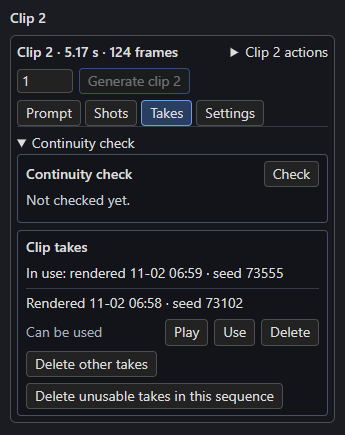
The first line is the take in use, such as In use: rendered 11-02 06:59 · seed 73555. Then come the other takes, newest first, each with when it was rendered, its seed, whether it can be used, and Play, Use and Delete.
A take can be used when it fits the clip as it is now and both clips beside it, so that using it never makes a neighbour render again. Otherwise its row says why, from the first rule it fails:
| Line | Means |
|---|---|
| Can be used | Its seed on the clip makes the clip current, and it joins the clips on both sides. |
| Can't be used: its files are missing | Its video or latents are gone from its folder. |
| Can't be used: seed not recorded | Saved before takes recorded their seed. It can still be played and deleted. |
| Can't be used: it was rendered as box 4 | Made for another place: clips were added or removed before it. |
| Can't be used: the box changed after this take | Its prompt, length, cut, pictures, RefMods, guides, clips, timed text or memory changed. |
| Can't be used: the node's settings changed | Width, height, context, audio or reference size changed since. |
| Can't be used: a box it remembers has another take | A clip it remembers a frame of rendered again, or has another take in use. |
| Can't be used: the box before changed | It continued from the clip before, which now ends with other frames. |
| Can't be used: the box after changed | The clip after continued from this one, and this take ends with other frames. |
Joins are compared against the saved latents of the neighbouring clip, within 0.001. A take that carried no frames (a cut, or clip 1) has no join with the clip before.
Using a take
Use puts the take in place: the take in use moves to takes/, the chosen take's files move back, and the clip gets the take's seed, as one undo step. Nothing renders.
Using a take can put other renders out of date, so Use lists them first and asks, for example "Boxes 7 and 9 remember a frame of box 3 and will need a new render." or "The bridge before box 4 will need a new render." Use this take goes ahead; Cancel keeps the take in use. Each take keeps its files' stamps, so switching back makes the others current again. Once every clip is done, the status rebuilds the full video with the chosen take.
Compare takes
Play on a row shows that take in the Studio's player. Switch flips to the take in use at the same moment, playing or paused as it was, and back again, so two takes can be compared shot by shot.
Make several takes
The number beside Generate clip N sets how many takes to render, from 1 to 10. With 3 the button reads Generate clip 2 · 3 takes and queues three runs of that clip, one after another, each with a new seed. The last is in use when they finish, the others are listed under Takes, and the number goes back to 1. Retake on the continuity check renders one take.
Delete takes
Each delete counts first and asks, for example "Delete 12 takes (1.4 GB)? This can't be undone."
- Delete on a row deletes that take.
- Delete other takes deletes every saved take of this clip, or this bridge, and keeps the take in use.
- Delete unusable takes in this sequence deletes every take that can't be used now, for any clip or bridge.
A deleted take is gone for good. The deletes never touch the take in use or anything outside takes/.
While the sequence renders
While a run of this sequence is running or waiting in ComfyUI's queue, Use and the deletes are off ("Wait until this sequence's runs finish."), and nothing is put back. Play still works. Right after an edit they are also off until the Studio has read the new status.
Undo, Redo and older workflows
Whenever the Timeline names a seed that a saved take fits, that take is put back. So Ctrl+Z after a Use or a render brings the earlier take back with its seed, Ctrl+Y brings the newer one back, and opening an older copy of the workflow does the same. Keep one Timeline per sequence open: two tabs or two nodes on the same sequence with different seeds each put back their own take, so the take in use can flip back and forth.
Files
Takes live in output/h3_sequences/<name>/takes/, one folder each, named for the files' stem and when they moved there, for example seg_0003_20261006-135000 or bridge@<id>_20261006-135000. The manifest lists them under takes.