Joins and bridges
Every clip after the first says how it meets the clip before it.
The join types
| Join | How to set it | What H3 gets |
|---|---|---|
| Continue | Cut and New scene both off. | The previous clip's last context_frames frames and, with carry_audio, its matching audio, frozen as native context. Motion and sound carry on. A continuing clip also uses the previous clip's saved last image as a guide at its first new frame so the pose does not reset. |
| Cut | Tick Cut in Settings → Join with previous clip. | No carried frames: a new camera angle. With visual memory, people, clothes and place can still hold. |
| New scene | Tick New scene. | A cut to a new place, time or look. Visual memory keeps its history while the new prompt defines the new setting. |
| Transition | Available through the Story bible's Join selector (Continue, Transition, Cut, New scene, with an optional note). | A scene-driven transition generated inside H3 that grows out of the scene. It writes the same flags, so rendering is unchanged. |
| Bridge | Insert bridge on a clip that cuts. | A few extra generated frames on the join. See below. |
Story planning chooses between seamless continuation, an in-scene transition and a hard cut according to your story, rhythm and Guide. Existing Timeline boundaries and Cut flags remain authoritative: Story never overrides a join you set.
Bridges
A bridge turns the hard cut between two rendered clips into a generated move. H3 renders a few new frames that leave the last frames of the clip before and arrive at the first frames of the clip after, and the full video plays them on the join. Neither clip renders again, and every clip keeps its render and its Timeline time.
Insert one
Select a clip after clip 1 that starts with Cut or New scene, and open Settings → Bridge.
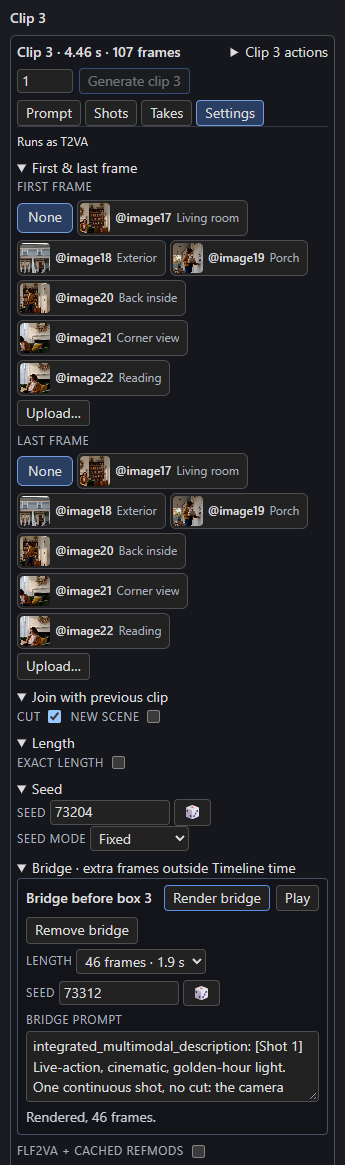
Insert bridge is on when this clip and the one before it are rendered, and the one before plays every frame it generates. Otherwise it is off, and the line underneath says why, for example "Render box 3 first." or, after an exact clip that drops frames, "Box 3 drops 9 frames, so the bridge before box 4 can't start from its last frame: give box 3 a length on the grid."
A new bridge has 29 frames, a new seed and a copy of the clip's prompt. Its panel has:
- Length: 12, 29 or 46 new frames, with their seconds.
- Seed, with a button for a new one.
- Bridge prompt: how the shot moves from the clip before into this one.
- Render bridge, Play and Remove bridge.
- A line with the bridge's state.
A small diamond on the join, in the bridge's state colour, opens the bridge when clicked. The status line adds bridges and the time they add, for example 6 clips · 30.8 s · 1 bridge, +1.9 s.
What H3 renders
A bridge run carries the last frames of the clip before from its saved latents (as a continuing clip does) and freezes the first frames of the clip after the same way. H3 generates only the frames in between. With 39 context frames and clips of at least 39 frames:
| New frames | Run | Adds to the full video |
|---|---|---|
| 12 | 90 | 0.5 s |
| 29 | 107 | 1.2 s |
| 46 | 124 | 1.9 s |
H3 gets the shared prompt and the bridge prompt, as text to video with audio. A bridge sends no pictures, references, first or last frame, guides, timed text or memory, so write the bridge prompt to describe the move on its own; any @image2 mention reads as "the described subject". The frozen frames carry the look at both ends.
Only the full video gets longer
A bridge lives on the join, outside the clips. Clip starts, audio lanes, timed text, the seconds the Story writes for, the check, drift, memory and pins never see it. The full video plays each rendered bridge between its two clips, so after a 29-frame bridge before clip 4, everything from clip 4 on plays 1.2 s later in the full video than on the Timeline. A clip ticked In the full video starts with its clip, after the bridges before it.
When a bridge needs a render
A bridge needs a render when it has no take yet, or when its prompt, length or seed changed, the node's width, height, context or audio changed, a clip beside it rendered again, or its files are missing. Until it renders, the full video leaves it out and the join plays as a hard cut. The state line says which:
| Line | Means |
|---|---|
| Rendered, 29 frames. | The full video plays it. |
| Needs a render: box 3 rendered again. | It has an older take, which the full video leaves out. |
| Plays as a cut until it renders. | No take yet. |
| Render box 3 first. | A clip it joins isn't rendered. |
| Waiting for the Timeline's status. | The Studio hasn't read the status since the last edit. |
A bridge after an exact clip that drops frames, or one whose prompt and the shared prompt are both empty, has a problem: its panel and diamond turn red and it can't render.
Rendering and removing
| Button | Renders |
|---|---|
| Render bridge | Only this bridge, keeping both clips. |
| ▶ Render N remaining | Every clip that isn't rendered, then every bridge that needs a render and has no problem, in Timeline order. |
| Render next | The next clip, or once every clip is rendered, the next bridge. |
| Play | The bridge's take in the player, labelled "Bridge before box 4". |
Nothing renders a bridge again by itself. Remove bridge takes it out so the join plays as a cut. Turning Cut and New scene off on its clip, deleting the clip or the one before it, or moving it to the front also removes the bridge. Undo restores the bridge with the clip. A Story Write that replaces the clips leaves no bridge behind.
Earlier bridge takes are kept in takes/, and one that still joins both clips can be put back; see Takes.
Older installs
An older H3 Continuity install ignores bridges in the Timeline and the sequence folder, and its Studio drops them when it saves.